Oplyon Editions · October ’26Start free

All connected

This month’s updates and everything Oplyon does for your business.

New this month · 01 — October update

Loyalty

The points program that turns one-time buyers into regulars. Built for businesses with physical stores: points are earned and used right at the till.

1.1

One tap at the till, and the points are theirs

The customer shows their card, the till recognises their points and turns them into a discount on the spot. No codes to remember, no manual math.

  • Card read at the till with one tap
  • Points discount applied before you confirm
  • New points are credited when the sale ends
☝ Try it: tap the card
Hold the card here

€1 = 1 point · 100 points = €5 off
Physical stores only

1.2

You set the rules in two minutes

Start from a quick preset (cautious, classic or generous) and tweak whatever you like. An example shows right away what the program costs your store.

  • How much a customer must spend to earn points
  • What a discount is worth and from how many points
  • Import balances customers already have
Settings · Loyalty☝ Try it: tap

Loyalty program

Prudente · 1%Classico · 5%Generoso · 10%
Every €1.00 spent earns 1 point. 100 points are worth 5,00 € off.

Card

OPL-000002

Try an example: customer spends50,00 €
50 points→discount 2,50 €

✓ Choose the rules

✓ Activate the program

✓ Import balances (optional)

1.3

You always know what it’s worth

Active cards, points in circulation and points liability: the report shows what customers give back and what the program costs.

  • New cards, points earned, used and expired
  • Value of customers’ points under current rules
  • Top cards by points, to know who to reward
Loyalty · Report☝ Try it: tap

Active cards

150

Points in circulation

17.910

Points liability

895,50 €

Monthly trend · tap a bar

EarnedUsed

02 — Web channels & connectors

Sell everywhere, manage from one place

Oplyon connects to your website and marketplaces: orders, products and stock move on their own, so you never copy anything by hand.

2.1

Connect your site and marketplaces

Shopify, PrestaShop, Magento, WooCommerce, BigCommerce and the main marketplaces: Amazon, eBay, Temu, Etsy and more. Switch a connector on with a toggle.

  • Several web channels and marketplaces together
  • Guided setup, no coding
  • Add a channel as your business grows
Connectors☝ Try it: tap

Connectors

Turn on the channels and marketplaces to integrate

0 active
ShopifyPrestaShopMagentoWooCommerceBigCommerce

2.2

Every order in a single list

Each order, from any channel, lands in Oplyon and updates stock instantly. Sell the last piece on Amazon and you won’t sell it twice elsewhere.

  • Orders from all channels in one place
  • Stock synced on every channel
  • Fewer mistakes, no double sales
Orders · all channels☝ Try it: tap
Oplyon
40stock

Tap a channel to simulate an order.

2.3

Create the product once

Enter the item with photos, price and variants and publish it on the channels you choose. Change a price once and it changes everywhere.

  • One entry for every channel
  • Price lists per sales channel
  • CSV import and export
Create an item☝ Try it: tap
🧥

Felpa oversize

SKU 4501 · Sizes S–XL

49,00 €

03 — Sales management

In store and online, just as simple

One area to sell at the counter and on the web, with documents ready: invoices, delivery notes, credit notes and orders.

3.1

Touch-mode till

An interface built for tablets and touch screens: categories on the left, products to tap, cart on the right. Cash or card, and the sale is recorded.

  • Search by SKU, EAN or name, scanner too
  • Discounts and customer from the same screen
  • Every sale updates the location’s stock
New POS sale · Touch mode☝ Try it: tap
— (POS sale)

TOTAL

0,00

Tap a product to add it

3.2

Online sales under control

See how many sales you made, what they’re worth and which channel they come from. In a few clicks add tracking and print daily orders and labels.

  • Order count per channel
  • Bulk tracking and daily order print
  • Order labels ready to print
🔒 app.oplyon.com/OnlineSales☝ Try it: tap
🌐

Online sales

Order count across all channels

📋

REGISTERED SALES

0

💶

TOTAL

0,00 €

📈

AVERAGE VALUE

0,00 €

ORDERS PER CHANNEL

72

📦Amazon.it36
🛍Shopify36

SALES PER CHANNEL

28.985,99 €

📦Amazon.it16.928,01 €
🛍Shopify12.057,98 €
Year/NumberCustomerTotal
2026/ON-2026-0062Metro Casa S.r.l.Amazon.it1.240,00 €
2026/ON-2026-0055FormaLab S.r.l.Shopify612,50 €
2026/ON-2026-0069Tekno Lab S.r.l.Shopify2.015,30 €
2026/ON-2026-0061Lambda Impianti S.r.l.Shopify389,00 €

3.3

Prepare orders with the barcode

Scan the order code, check the products and confirm preparation. The queue shows what is to prepare, being prepared or ready.

  • Order barcode scanning
  • Always up-to-date preparation queue
  • Preparation report for the team
Prepare orders☝ Try it: tap
▮▮ Scan or type the order code…
Preparation queue0/4
2026/WOO0001941×To prepare
2026/WOO0001931×To prepare
2026/WOO0001921×To prepare
2026/WOO0001911×To prepare

04 — Warehouse

Always know what you have and where

Stock, movements, suppliers and prices in one place, with your inventory value always under control.

4.1

Inventory that updates in a moment

Scan the code, type +5 or −2 and stock updates. See at once what is running low and what your warehouse is worth.

  • Quick adjustments and bulk edits
  • Low-stock threshold and category filters
  • Serials, snapshots and CSV/XLSX export
🔒 app.oplyon.com/Inventory☝ Try it: tap
📦

Inventory

Stock, movements and quantities control

CSVXLSXMovementsCommitted reportSnapshotBulk adjust
▮▯

TOTAL SKUS

36

🧱

TOTAL QUANTITY

2.624

⚠

LOW STOCK (< 5)

6

💶

WEIGHTED AVG VALUE

79.751 €

SKUProductQtyNew qty
OPL-NB-14Notebook business 14"10
OPL-MON-27Monitor 27" QHD16
OPL-KIT-WLKit tastiera e mouse wireless47
OPL-PRN-A4Stampante multifunzione A4low3
In “New qty” you can add or subtract (e.g. +5 / -2).

4.2

From supplier order to stock-in

Send the supplier order from Oplyon, record the purchase invoice and stock loads with weighted average cost already calculated.

  • Supplier orders and purchase credit notes
  • Weighted average and last cost
  • Price management and product categories
Warehouse · Purchasing☝ Try it: tap

05 — Multi-location management

More stores, one system

With several stores, Oplyon connects them all: stock, sales and documents go to the right location and you control everything from one dashboard.

5.1

Move goods between locations

Create a transfer from the central warehouse to a store and stock updates in both locations, with operator and status always tracked.

  • Warehouse transfers with draft and completion
  • Inventory reservations
  • Location filters on orders and documents
🔒 app.oplyon.com/WarehouseTransfers☝ Try it: tap
⇄

Warehouse transfers

Move stock between warehouses keeping full traceability.

MAGAZZINO MILANO

0

pieces in stock

MAGAZZINO ROMA

0

pieces in stock

FromToLinesStatus
No transfers found.

5.2

Every till, one view

Register the tills and devices of each store and see sales from all locations together, or location by location.

  • Devices and tills for each store
  • Consolidated or per-location totals
  • One account, many stores
Devices and tills · Dashboard☝ Try it: tap
▼ ▼ ▼

Today's sales · all locations

1410,00 €

AllCentroNordOnline

06 — Returns & refunds

A well-handled return builds loyalty

From the customer’s return to the refund, every step is tracked and stock updates according to the product’s condition.

6.1

From return to refund, step by step

Add the return manually or import it from an online sale. Follow it from In progress to Refunded, with channel, tracking and value.

  • Statuses: in progress, received, verified, refunded, rejected
  • Refunded orders always searchable
  • Service centre and serial number search
🔒 app.oplyon.com/SalesReturns☝ Try it: tap
↻

Returns management

Customer returns, statuses, channels and values

☑

RETURNS FOUND

1

⏳

PENDING

1

📥

RETURNED ITEMS

2

💶

RETURN VALUE

612,50 €

Quick guide

DateCustomerChannelStatusValue
23/10/2026Retail Demo S.p.A.Shopify612,50 €
Stock Monitor 27" QHDsellable 18 · refurbished 2

6.2

Stock follows the condition

If the product is intact it goes back on sale as new; if refurbished it goes to a separate bucket; if damaged it is deducted from stock.

  • Intact: back in sellable stock
  • Refurbished: dedicated bucket
  • Damaged: deducted from stock
New return · Condition☝ Try it: tap

Sellable as new

11

Refurbished

2

07 — Administration

Cash, costs and margins, no spreadsheets

From the cash journal to treasury, from financial analysis to VAT: administration works on the same data as sales, so the numbers always add up.

7.1

Cash journal

Open the till, take payments, close the day and deposit in the bank. Online and POS sales flow in by themselves and closing differences are visible at once.

  • Till opening and closing with difference
  • Receipts and payments from every source
  • Bank deposits and CSV export
🔒 app.oplyon.com/Administration☝ Try it: tap
🧾

Cash book

↘

NET RECEIPTS

0,00 €

↗

PAYMENTS

0,00 €

💵

CASH ON HAND

0,00 €

🏦

TOTAL BANK BALANCE

0,00 €

≠

AVG CLOSING DIFFERENCE

0,00 €

📅

TILL

closed

Receipts, payments and running balance

1/10
2/10
3/10
4/10
5/10

7.2

Treasury: actual vs forecast

Compare what you collected and paid with what you expect to collect and pay, net of provider fees.

  • Receipts, payments and banks in one chart
  • Forecast turns into actual with one click
  • Opening bank balance and total balance
Cash flow · Treasury☝ Try it: tap

Inflows (actual)

18420,00 €

Outflows (actual)

7310,00 €

Overall balance

11110,00 €

Actual onlyBothForecast only
Actual 11304,00 €Forecast 9792,00 €

7.3

Fixed and one-off costs

Record rent, utilities and one-off expenses with the right VAT rate and months. Costs feed every analysis.

  • Fixed costs for all months or just some
  • One-off costs kept separate
  • Rates from Settings › Tax codes
Operating costs☝ Try it: tap

Fixed costs

0,00 €

One-off

0,00 €

Total costs

0,00 €

Valid for 12 months

7.4

Financial analysis: when are you in profit

Break-even point, average margin, net profit and a calculator that tells you how much to sell to reach the margin you want.

  • Revenue vs costs by period and channel
  • Revenue needed for your target margin
  • VAT analysis and PDF reports
Financial analysis☝ Try it: tap

BEP

9800,00 €

Avg gross margin

42%

Net profit

5320,00 €

Target margin30%
Revenue needed14000,00 €
100%

Video

Video guide to the platform

A guided tour of the real platform, section by section: from the dashboard to financial analysis.

Dashboard · 01/26

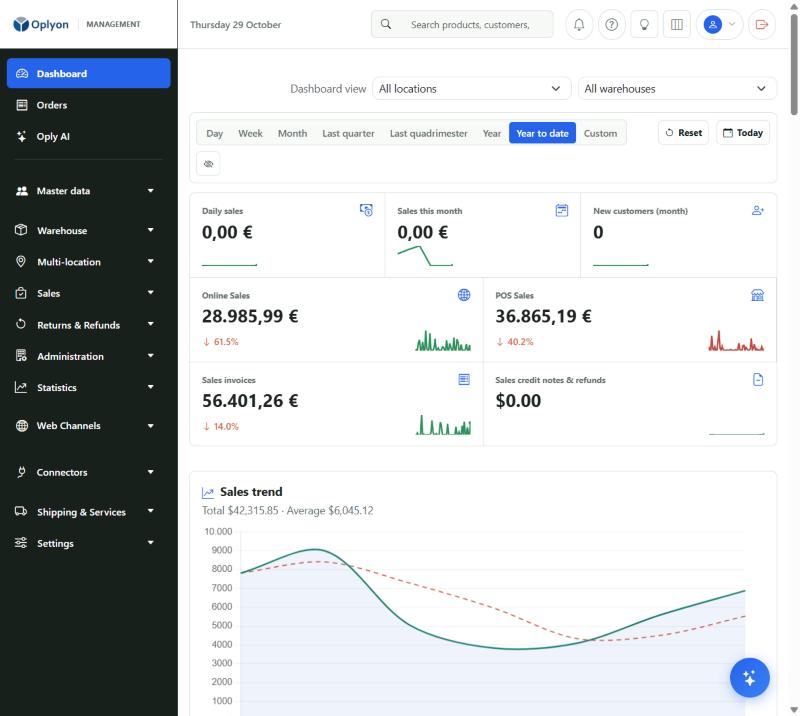
Dashboard

Everything under control on one screen: pick period and location and see daily and monthly sales, online and in-store sales, invoices, credit notes and new customers.

🔒 app.oplyon.com/
Dashboard
1Online and POS sales

Ready to put your whole business in one place?

Start free